
Table of Contents
You’ve studied for months. You’ve revised every topic, solved hundreds of practice questions, and you finally walk into the exam hall ready to give your best. But what if a simple, avoidable mistake on the OMR sheet wipes out all that preparation? It happens more often than you think — and the worst part is, the machine doesn’t give you a second chance.
This guide covers everything you need to know about how to fill an OMR sheet correctly, the most common OMR sheet filling mistakes students make (especially in UPSC and other competitive exams), and exactly how to avoid them.
What Is an OMR Sheet?
OMR stands for Optical Mark Recognition. It’s a specially designed answer sheet used in competitive exams like UPSC Civil Services, SSC, IBPS, NEET, CUET, and state-level PCS exams.
The sheet is read by a scanning machine — not a human examiner. That single fact is what makes OMR filling so unforgiving. The scanner doesn’t know what you meant to do. It only reads what’s physically marked on the paper. A half-filled bubble, a stray mark on a restricted area, or a wrong booklet series code — any of these can result in zero marks, negative marking, or even disqualification of your paper.
Understanding the rules before you sit down to fill the sheet is not optional. It’s essential.
What You’ll Find on a Standard OMR Sheet
Before learning what to do (and not do), it helps to understand what an OMR sheet actually contains. A typical UPSC-style OMR sheet has these sections:
- Roll Number – your 7-digit unique identifier
- Subject Code – a 2-digit code for the paper you’re appearing in
- Booklet Series – A, B, C, or D (tells the machine which question set you had)
- Answer bubbles – rows numbered 1 to 160 (or as per the paper), each with options (A), (B), (C), (D)
- Candidate’s Signature area
- Invigilator’s Signature area
- Restricted / Do Not Mark area – a zone strictly off-limits for candidates
Each of these sections needs to be handled carefully and in a specific way.
How to Fill OMR Sheet Correctly: Step-by-Step
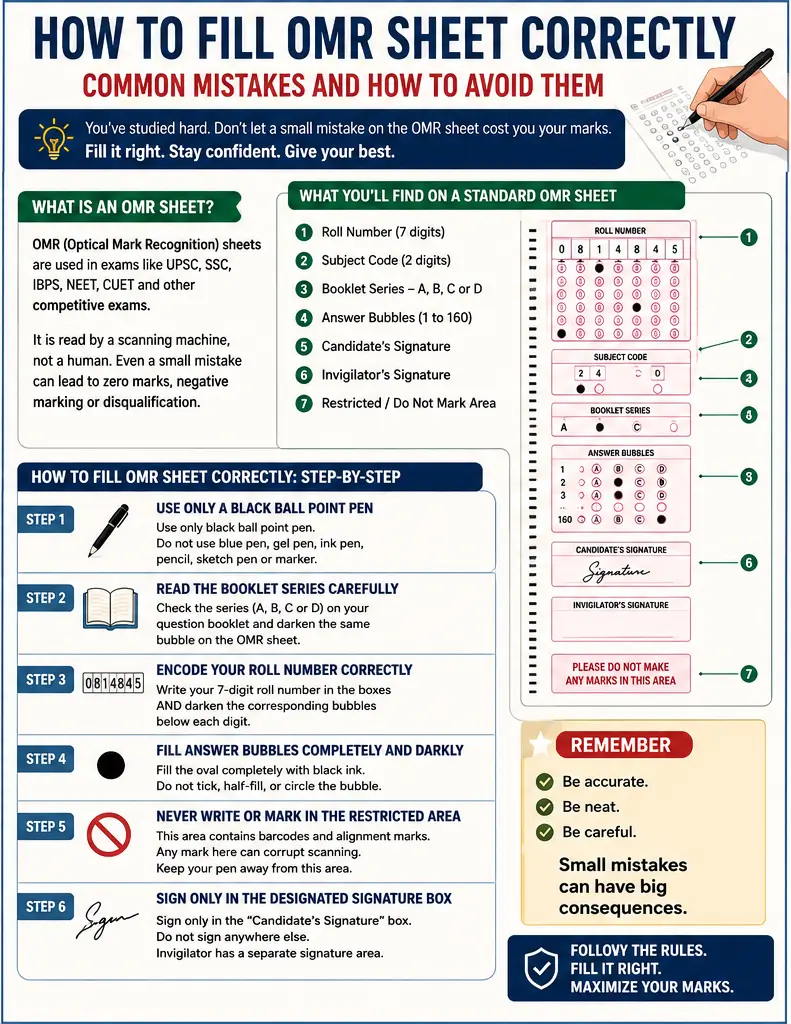
How to Fill OMR Sheet Correctly: Step 1 – Use Only a Black Ball Point Pen
This is non-negotiable. The UPSC official OMR instruction clearly states: “USE BLACK BALL POINT PEN ONLY.”
Do not use:
- Blue ball point pen
- Gel pen
- Ink pen / fountain pen
- Pencil
- Sketch pen or marker
The scanner is calibrated to read black ball point ink specifically. Any other medium may either not register or cause scanning errors.
How to Fill OMR Sheet Correctly: Step 2 – Read the Booklet Series Carefully Before Encoding
When you receive your question booklet, check the series printed on it — A, B, C, or D. Now fill the same series on your OMR sheet by darkening the correct bubble.
This seems obvious, but it’s one of the most frequently reported errors in UPSC exams. The invigilator is responsible for verifying and encoding the booklet series on your behalf — but as a candidate, always double-check before proceeding.
How to Fill OMR Sheet Correctly: Step 3 – Encode Your Roll Number Correctly
Write your roll number in the boxes provided AND darken the corresponding number bubbles below each digit. Both steps are required.
For example, if your roll number is 0814845, you need to:
- Write “0814845” in the handwritten box
- Darken bubble “0” in column 1, bubble “8” in column 2, bubble “1” in column 3 — and so on for all 7 digits
The machine only reads the darkened bubbles — not the handwritten digits. So if you write the correct number but darken the wrong bubbles, your paper will be processed with the wrong identity.
How to Fill OMR Sheet Correctly: Step 4 – Fill Answer Bubbles Completely and Darkly
Each answer bubble must be filled completely — not with a tick, dot, cross, or half-circle. The scanner looks for a fully darkened oval.
Correct way: Fill the entire oval firmly with black ball point pen.
Wrong ways:
- Putting a dot in the center
- Drawing a tick or cross inside the bubble
- Partially shading the bubble
- Circling the bubble instead of filling it
Incomplete bubbling is flagged as an error by the OMR system and the response is not counted.
How to Fill OMR Sheet Correctly: Step 5 – Never Write or Mark in the Restricted Area
Every OMR sheet has a section clearly labeled: “PLEASE DO NOT MAKE ANY MARKS IN THIS AREA.”
This zone contains machine-readable barcodes and alignment marks that the scanner uses to process your sheet. Writing or making any stray marks here — even accidentally — can corrupt the scanning process for your entire sheet.
Keep your pen away from this area at all times, even while writing your roll number or signing.
How to Fill OMR Sheet Correctly: Step 6 – Sign Only in the Designated Signature Box
Your signature must go only in the box labeled “Candidate’s Signature.” Some students sign in the wrong area or fill details at a place not meant for them — this is a documented mistake that leads to processing errors.
The invigilator has a separate signature area. Do not touch that column.
Common Mistakes in OMR Sheet Filling (With Real Examples)
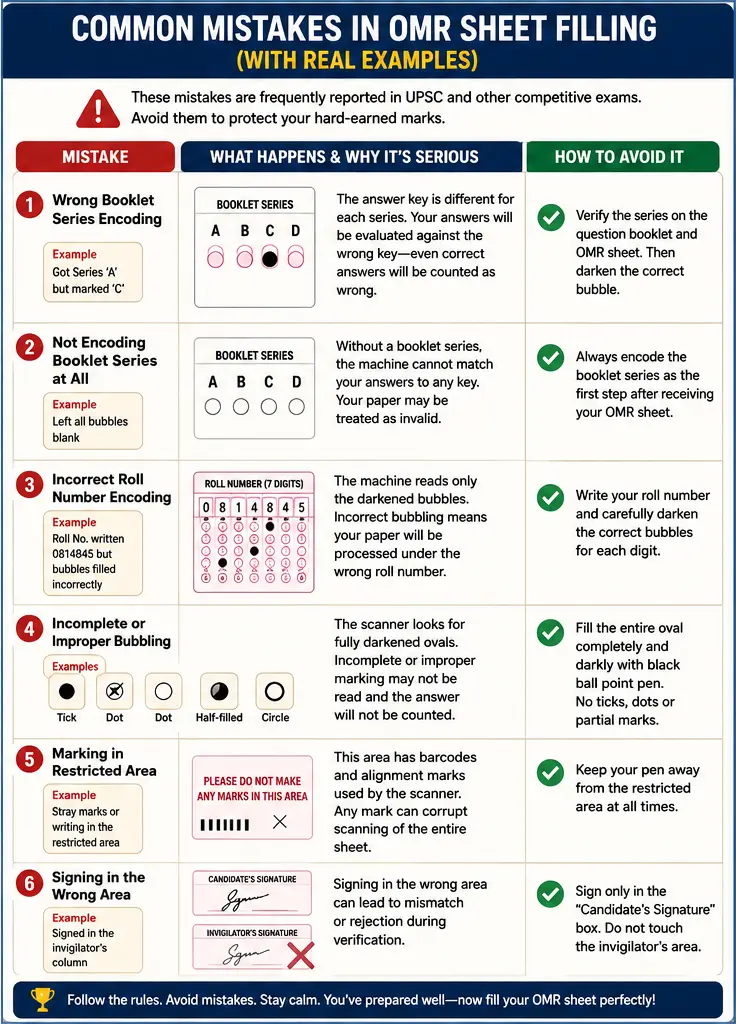
The following mistakes are directly documented in official UPSC records and are the most commonly reported errors across competitive exams:
Common Mistakes in OMR Sheet: Mistake 1 – Wrong Booklet Series Encoding
What happens: A candidate receives Series ‘A’ but darkens bubble ‘C’ instead.
Why it’s serious: The answer key is different for each series. If you mark ‘C’ but were given ‘A’, your entire answer sheet is evaluated against the wrong key — meaning even correct answers are counted as wrong.
Fix: Before bubbling the series, hold your question booklet and OMR sheet side by side, verify the series letter, then darken it.
Common Mistakes in OMR Sheet: Mistake 2 – Not Encoding Booklet Series at All
What happens: The candidate leaves the Booklet Series bubble completely blank.
Why it’s serious: Without a valid booklet series, the machine cannot match your answers to any key. Your paper may be treated as invalid.
Fix: Make it a habit — the very first thing you do after receiving your answer sheet is check and encode the booklet series.
Common Mistakes in OMR Sheet: Mistake 3 – Wrong Subject Code and Roll Number Encoding
What happens: The candidate writes the correct roll number in the box but darkens the wrong bubbles, or darkens bubbles in the wrong columns.
Why it’s serious: Your paper becomes unidentifiable. Even if your answers are perfectly correct, they can’t be linked to your identity.
Fix: After encoding, verify each digit one by one — left to right — against your admit card. This takes 30 seconds and can save your entire result.
Common Mistakes in OMR Sheet: Mistake 4 – Incomplete Bubbling of Answers
What happens: A candidate marks a tick, a dot, or fills only half the bubble when selecting an answer.
Why it’s serious: The scanner reads based on ink density in a defined area. A partial mark falls below the threshold and is treated as “no response” — which in exams with negative marking can ironically still cost you marks if the system flags it.
Fix: Practice filling bubbles on a practice OMR sheet before your actual exam. Build the habit of filling each bubble fully in one slow, firm stroke.
Common Mistakes in OMR Sheet: Mistake 5 – Making Marks or Writing in the Prohibited Area
What happens: The candidate accidentally writes something or makes a stray pen mark in the “Do Not Mark” zone at the bottom or side of the sheet.
Why it’s serious: This area contains the machine’s alignment and barcode system. Marks here can cause scanning errors that affect the processing of the entire sheet.
Fix: Be extra careful while writing roll number and signing. Keep your writing inside the provided boxes only.
Common Mistakes in OMR Sheet: Mistake 6 – Filling Details at the Wrong Place on the Attendance List (SAL)
What happens: When filling the Scannable Attendance List (SAL), some candidates write their signature or details in the invigilator’s column or in another candidate’s row.
Why it’s serious: The attendance record becomes inaccurate, and your presence may not be properly recorded.
Fix: Always verify the row with your name and roll number before signing the attendance list. Never write in adjacent rows.
Quick Checklist Before You Submit Your OMR Sheet
Use this checklist in the final 5 minutes of your exam:
- ✅ Booklet Series is darkened correctly (matching your question booklet)
- ✅ Roll Number is written AND bubbled correctly in all 7 columns
- ✅ Subject Code is encoded correctly
- ✅ All answered questions have completely darkened bubbles
- ✅ No stray marks in the “Do Not Mark” area
- ✅ Signature done only in the candidate’s signature box
- ✅ No erasures or whitener used anywhere on the sheet
- ✅ Only Black Ball Point Pen has been used throughout
Pro Tips for OMR Sheet Filling That Toppers Follow
These small habits make a big difference:
- Practice on sample OMR sheets at home before the exam — especially for darkening bubbles fully and quickly
- Match every 10th answer on the OMR sheet with your question paper to prevent row-shift errors
- Don’t rush the header section — spend a full 2 minutes just on Roll Number, Series, and Subject Code before touching the answer section
- Never use whitener or correction fluid — it damages the sheet’s surface and causes scanning failure
- Avoid folding or stapling the OMR sheet — even creases can affect scanning accuracy
- Keep your sheet flat on the desk and don’t press too hard to avoid indentations on the back of the sheet
Frequently Asked Questions (FAQs)
Q1. Can I use a blue pen on the OMR sheet?
No. UPSC and most competitive exam bodies strictly specify Black Ball Point Pen only. Blue pens may not be read correctly by the scanner.
Q2. What happens if I darken two bubbles for one question?
Q3. What if I make a mistake in my Roll Number encoding?
Q4. Is the booklet series filled by the candidate or invigilator?
Both have responsibilities. The invigilator is required to verify and confirm the booklet series with their pen, but the candidate must also encode the correct series in the answer bubbles themselves.
Q5. What is a Scannable Attendance List (SAL)?
The SAL is a machine-readable attendance record used in UPSC exams. Candidates must sign it and fill details only in their designated row. Filling details at the wrong place is a documented and common mistake.
Q6. Can stray marks on the OMR sheet cancel my paper?
Marks in the restricted/barcode area can disrupt scanning and potentially invalidate the sheet. Always be careful while writing near the edges of the form.
Q7. How do I practice OMR filling at home?
Download free sample OMR sheets from the official exam website or UPSC’s practice materials. Use a Black Ball Point Pen and time yourself to simulate real exam conditions.
Final Thought
The OMR sheet is the last link between your preparation and your result. You can answer every question correctly and still fail if the sheet is filled wrong. The machine is unforgiving — but the good news is, so are the mistakes. They’re predictable, they’re avoidable, and now you know exactly what to watch out for.
Take the final 5 minutes of every exam seriously. Don’t rush the submission. A calm, checked, correctly filled OMR sheet is as important as knowing the right answers.